

Getting Started with IPWorks BLE and BLEServer
Requirements: IPWorks BLE
Contents
- Introduction
- Prerequisites
- Bluetooth LE Overview
- Adding Services & Characteristics
- Advertising
- Handling Client Requests
- Usage Notes
- Putting It All Together
Prerequisites
Windows Notes:
Please note that the BLEServer component is only supported by Windows 10 Creator's Update (10.0.15063.0) and later. In addition, the BLEServer component requires .NET 4.5 or higher be installed on the system.
Java Notes:
The Java edition uses Java Native Interface (JNI) and relies on included native C++ libraries that perform the actual BLE functions. The BLEServer component will attempt to load the platform-specific binary at runtime, so they need to be included in the project as follows:
- jniipworksble24.dll for Windows
- libjniipworksble.24.0.so for Linux
- libjniipworksble.24.0.dylib for macOS
Android Notes:
The BLEServer component requires Android API level 21 or higher.
iOS/macOS Notes:
The BLEServer component has the following operating system requirements:
- iOS 5.0+
- iPadOS 5.0+
- Mac Catalyst 13.0+
- macOS 10.10+
Linux Notes:
On Linux, the BLE components rely on BlueZ and D-Bus. These packages must be installed in order to use the components. Many Linux distributions come with BlueZ and D-Bus pre-installed.
A Note on the BLE Peripheral Role:
Acting as a GATT server means acting as a BLE peripheral, and not every Bluetooth adapter or operating system configuration supports this role (many older or lower-end adapters only support the central role, i.e. connecting out to other devices, which is what BLEClient uses). If you attempt to add a characteristic or start advertising on a system that doesn't support the peripheral role, the BLEServer component will fail with an error right away. If you run into this, double-check that your adapter and OS both support acting as a BLE peripheral before looking any further into your code.
Introduction to IPWorks BLE and BLEServer
IPWorks BLE is a suite of components which provide straightforward access to Bluetooth Low Energy (or BLE) operations.
This article will focus specifically on the BLEServer component, a simple yet flexible BLE GATT server (peripheral) implementation. The BLEServer component makes it easy to advertise your own services and characteristics, and to respond to the requests of remote BLE GATT clients (such as those built with BLEClient) that connect to them.
This article will open with a brief overview of Bluetooth LE and the GATT data model, after which it will dive into how to use the BLEServer component. By the end of this article, you'll have learned how to:
- Define the services and characteristics your application exposes
- Advertise those services so nearby GATT clients can discover and connect to them
- Respond to read and write requests from connected clients
- Push real-time value updates to clients that have subscribed to a characteristic
- Track clients as they connect and disconnect
All code snippets in this article are written in C#, and have the variable in the code block below available to them.
// Global Variables
private BLEServer bleserver1 = new BLEServer();
Bluetooth LE Overview
What is Bluetooth LE?
Before discussing what Bluetooth LE (BLE) is, it's important to note what it isn't. Many are already familiar with what is colloquially referred to as "classic Bluetooth"; it's been around since the late 1990s, and has undergone many iterations. Since BLE shares the "Bluetooth" name, a common misconception is that it's a "feature" of classic Bluetooth. It may come as a surprise that, in reality, BLE has very little in common with classic Bluetooth; it's a standalone technology with its own protocols and features.
BLE, introduced around 2010, was designed from the ground up to operate using as little energy as possible, on components which cost as little as possible. Unlike classic Bluetooth, which can transmit great amounts of data for long periods of time, BLE is intended for use-cases that require only periodic transmissions of small chunks of data.
BLE, then, is not targeted at areas where classic Bluetooth already excels; it's intended to enable new use-cases. The best example of this is the "Internet of Things" (IoT); the prevalence of IoT devices continues to rise, and BLE is the perfect technology for connecting them.
The BLE Data Model: GATT
The Attribute (ATT) Protocol
The BLE specification's most basic client/server relationship is defined by something called the Attribute (ATT) protocol, whose data model is built on the concept of attributes. In the ATT protocol's data model, there is a server which contains attributes, and a client which can send requests to the server to interact with those attributes. Attributes themselves are stored in a flat table, and they consist of these four things:
- A 16-bit attribute handle which uniquely identifies an attribute from the others on the server
- A value, which is the actual data that the attribute holds
- A UUID, a universally unique Id which specifies the type of data contained in the value
- A set of permissions, which apply to all clients
In practice, the ATT protocol (and its data model) are a bit too low-level to be useful. Instead, the component allows you to work with profiles which are based off of the Generic Attribute (GATT) profile. However, because the GATT profile is built atop the ATT protocol, it's helpful to understand the basics of attributes, as well as the fact that the GATT data model inherits the ATT protocol's client/server architecture.
The Generic Attribute (GATT) Profile
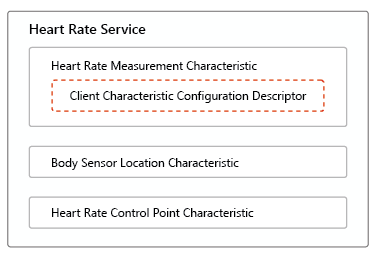
In BLE terms, a "profile" typically refers to a specification that, among other things, gives meaning to any services, characteristics, or descriptors that have one of the UUIDs associated with that profile. For example, the UUIDs associated with the Heart Rate Service profile are what give meaning to the Heart Rate Service, its characteristics, and those characteristics' descriptors.
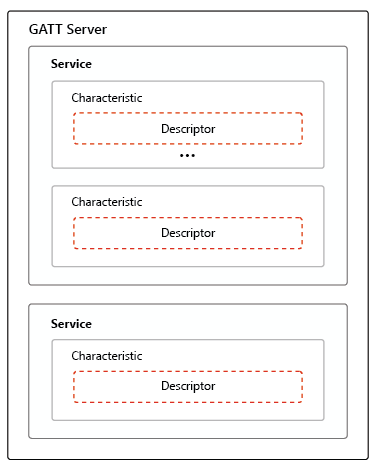
The GATT profile specifies a generic definition for services, characteristics, and descriptors (collectively referred to as "GATT objects"), all of which are built out of ranges of attributes in a server's flat attribute table. All other BLE profiles extend from the GATT profile, so they all use the concepts of services, characteristics, and descriptors that the GATT profile defines. By mandating a common framework for interpreting attributes, discovering GATT objects, data manipulation, and more; the GATT profile ensures that any GATT client can talk to any GATT server. It is for this reason that all BLE devices must support the GATT profile.
Services
Services are the top-level "container" objects of the GATT hierarchy, and are fairly simple. Every service has a UUID, and contains at least one characteristic. Profiles typically define a small number of services (many of them only define one).
Characteristics
Characteristics, which are always owned by a service, are where data actually lives in the GATT hierarchy. They have a UUID, properties (which are referred to as "flags"), and a value.
Descriptors
Descriptors are the simplest and least diverse of the GATT objects, and have only a UUID and a value. They are attached to characteristics in order to augment them with specific pieces of metadata, such as a user-friendly description or the format of the characteristic's value. BLEServer focuses on services and characteristics, since these are what you, as the peripheral, define and expose; descriptor management for the handful of descriptors clients are likely to care about (such as the Client Characteristic Configuration Descriptor used for subscriptions) is handled for you automatically.
Adding Services & Characteristics
Before you can advertise a GATT service, you must define the characteristics it exposes. BLEServer exposes the following API for defining services and characteristics:
- The AddCharacteristic method, used to add a characteristic (and, implicitly, the service that owns it).
- The Services and Characteristics collection properties, which contain the services and characteristics you've added so far.
Call AddCharacteristic, passing the UUID of the service the characteristic belongs to, the UUID of the characteristic itself, and a bitmask of Props flags describing what remote clients are permitted to do with it. If the service doesn't already exist yet, it's created automatically the first time a characteristic is added to it.
As with BLEClient, UUIDs may be given as 16-, 32-, or 128-bit hexadecimal strings (a mixture of formats is fine; they're all converted to 128-bit internally).
Props is a bitmask made up of one or more of the following flags, combined with a bitwise OR:
| 0x0002 | Read |
| 0x0004 | WriteWithoutResponse |
| 0x0008 | Write |
| 0x0010 | Notify |
| 0x0020 | Indicate |
Read
The characteristic's value may be read by clients. Handle the ReadRequested event to supply the value; see Responding to Read Requests.
WriteWithoutResponse / Write
Clients may write the characteristic's value, without or with an acknowledgement of success/failure, respectively. Handle the WriteRequested event to be notified of, and respond to, these requests; see Responding to Write Requests.
Notify / Indicate
Clients may subscribe to receive value updates, unacknowledged or acknowledged, respectively. Handle the SubscriptionChanged event, and use the UpdateValue method to push new values; see Characteristic Subscriptions.
A characteristic cannot be added to a service that is already being advertised (see Advertising); once a service has started advertising, its set of characteristics is fixed until you call StopListening.
Adding Characteristics Example
// Add a simple read-only "Battery Level" characteristic to a "Battery Service".
bleserver1.AddCharacteristic("180F", "2A19", 0x0002);
// Add a write-only "Alert Level" characteristic to an "Immediate Alert" service.
bleserver1.AddCharacteristic("1802", "2A06", 0x0008);
Advertising
Once you've added the characteristics you need for a service, you're ready to start advertising it so that nearby GATT clients can discover and connect to it. BLEServer exposes the following API for advertising:
- The StartListening and StopListening methods, which begin and end advertising a service.
- The ServiceId and Listening properties, used together to check whether a particular service is currently being advertised.
- The AdvertisementStatusChanged event, which fires once advertising has actually started or stopped (or is unexpectedly aborted, for example because the adapter was disabled).
Call StartListening, passing the UUID of a service you've already added characteristics to. Calling it for a service that doesn't exist, or that is already being advertised, will cause an error.
To check whether a service is currently being advertised, set the ServiceId property to its UUID and inspect the Listening property. Since AdvertisementStatusChanged doesn't identify which service's status changed (due to limitations in the underlying libraries), this is also how you determine which one it pertains to if you're advertising more than one service at a time.
Call StopListening to stop advertising a service.
Advertising Example
// AdvertisementStatusChanged event handler.
bleserver1.OnAdvertisementStatusChanged += (s, e) => Console.WriteLine("Advertising status: " + e.Status);


bleserver1.AddCharacteristic("180F", "2A19", 0x0002);
bleserver1.StartListening("180F");


// Check whether the Battery Service is currently being advertised.
bleserver1.ServiceId = "180F";
Console.WriteLine("Listening: " + bleserver1.Listening);


// ...
bleserver1.StopListening("180F");
Handling Client Requests
The Connected Event
Unlike a typical server, the underlying Bluetooth APIs do not notify BLEServer when a remote device forms a low-level BLE connection to it. Instead, the Connected event fires the first time a client interacts with one of your characteristics, by reading it, writing it, or subscribing to it.
The ClientId parameter Connected provides is a platform-specific string identifying the client, and is also passed to the ReadRequested, WriteRequested, SessionStatusChanged, and Disconnected events, so that you can associate related requests with a particular client.
bleserver1.OnConnected += (s, e) => Console.WriteLine("Client connected: " + e.ClientId);
Responding to Read Requests
Handle the ReadRequested event to respond to read requests for characteristics that were added with the Read flag set.
The event's ClientId, ServiceId, and CharacteristicId parameters identify the requesting client and the characteristic being read. To answer the request, set ResponseValue to a hex-encoded string of the bytes to return, and leave Accept set to its default value of True. If you don't set ResponseValue, an empty value is returned. To reject the request instead (for example, if the value isn't currently available), set Accept to False.
Responding to Read Requests Example
bleserver1.OnReadRequested += (s, e) => {
  if (e.CharacteristicId.Equals("00002A19-0000-1000-8000-00805F9B34FB", StringComparison.OrdinalIgnoreCase)) {
    // Battery Level characteristic: respond with 90%, encoded as a single hex byte.
    e.ResponseValue = "5A";
  } else {
    e.Accept = false;
  }
};
Responding to Write Requests
Handle the WriteRequested event to be notified of, and respond to, write requests for characteristics that were added with the Write or WriteWithoutResponse flag set.
The event's Value parameter holds the hex-encoded string of bytes the client wants to write, and WithResponse indicates whether the client is expecting an acknowledgement (a "Write") or not (a "Write Without Response"). If WithResponse is True, set Accept to False to reject the write; Accept has no effect on writes made without a response, since the client isn't told the outcome either way.
Responding to Write Requests Example
bleserver1.OnWriteRequested += (s, e) => {
  Console.WriteLine("Client " + e.ClientId + " wrote: " + e.Value +
    " (WithResponse: " + e.WithResponse + ")");
  // Reject writes with an odd number of bytes, just as an example.
  if (e.WithResponse && (e.ValueB.Length % 2) != 0) e.Accept = false;
};
Characteristic Subscriptions
For characteristics added with the Notify or Indicate flag, clients can subscribe to receive real-time value updates instead of having to repeatedly read the value themselves. Handle the SubscriptionChanged event to know when a characteristic gains or loses subscribed clients, and call UpdateValue to push a new value out to them.
SubscriptionChanged's ServiceId and CharacteristicId parameters identify the characteristic, and IsSubscribed reflects its overall subscription state: True if it now has one or more subscribed clients, False if it has none. This event does not indicate which specific client subscribed or unsubscribed, nor how many clients are currently subscribed.
UpdateValue takes the Ids of the service and characteristic, along with the new value as a byte array. It broadcasts the value to every client currently subscribed to that characteristic; it does not target a specific client. The characteristic must have been added with the Notify or Indicate flag, and if no clients are currently subscribed, calling UpdateValue has no effect. If the characteristic is not currently being advertised, UpdateValue will throw an exception.
Characteristic Subscriptions Example
bleserver1.AddCharacteristic("180F", "2A19", 0x0002 | 0x0010); // Read + Notify
bleserver1.OnReadRequested += (s, e) => e.ResponseValue = "5A";


// SubscriptionChanged event handler.
bleserver1.OnSubscriptionChanged += (s, e) => {
  Console.WriteLine((e.IsSubscribed ? "Gained" : "Lost") + " a subscriber for characteristic " + e.CharacteristicId);
};


bleserver1.StartListening("180F");


// Later, whenever the battery level actually changes, push the new value to any
// subscribed clients. If nobody is subscribed, this simply does nothing.
bleserver1.UpdateValue("180F", "2A19", new byte[] { 0x5A });
Tracking Client Connections
BLEServer exposes two additional events for tracking a client's connection over time, alongside Connected:
- The SessionStatusChanged event, which fires whenever the underlying GATT session for a connected client becomes active or is closed. It may fire more than once for the same client over the lifetime of a connection, for instance if the client temporarily goes out of range.
- The Disconnected event, which fires when the GATT session for a previously-connected client is closed. If the client had any active characteristic subscriptions, SubscriptionChanged fires separately to reflect their removal.
bleserver1.OnSessionStatusChanged += (s, e) =>
  Console.WriteLine("Client " + e.ClientId + " session status: " + e.Status);
bleserver1.OnDisconnected += (s, e) =>
  Console.WriteLine("Client disconnected: " + e.ClientId);
Usage Notes
There are a few important things to keep in mind while working with BLEServer:
- Do not block or perform any long-running operations within event handlers, particularly ReadRequested and WriteRequested. The underlying platform APIs rely on timely delivery of these events in order to function properly.
- Most platforms will, in some way, limit the use of Bluetooth APIs while your application is in the background. Be aware of the limitations your platform places on BLE usage while backgrounded, and be ready to act accordingly.
- Be sure to call StopListening for each of your services when you're finished advertising them.
- A characteristic's set of flags is fixed once its owning service starts advertising; if you need to change it, you'll need to StopListening, which allows characteristics to be added again.
Putting It All Together
The example below ties everything covered in this article together into a single, complete Battery Service implementation: it advertises a Battery Level characteristic that supports both reads and subscriptions, responds to read requests with a value that changes over time, and pushes updates out to any subscribed clients whenever that value changes.
private BLEServer bleserver1 = new BLEServer();
private byte batteryLevel = 100;


void SetupBatteryService() {
  bleserver1.AddCharacteristic("180F", "2A19", 0x0002 | 0x0010); // Read + Notify


  bleserver1.OnReadRequested += (s, e) => {
    e.ResponseValue = batteryLevel.ToString("X2");
  };


  bleserver1.OnSubscriptionChanged += (s, e) => {
    Console.WriteLine((e.IsSubscribed ? "Gained" : "Lost") + " a Battery Level subscriber.");
  };


  bleserver1.OnConnected += (s, e) => Console.WriteLine("Client connected: " + e.ClientId);
  bleserver1.OnDisconnected += (s, e) => Console.WriteLine("Client disconnected: " + e.ClientId);


  bleserver1.StartListening("180F");
}


// Call this whenever the battery level actually changes (e.g. from a timer, or a
// hardware sensor reading). Subscribed clients will receive the new value automatically.
void UpdateBatteryLevel(byte newLevel) {
  batteryLevel = newLevel;
  bleserver1.UpdateValue("180F", "2A19", new byte[] { batteryLevel });
}
With this in place, any BLEClient (or other GATT client) that discovers your Battery Service will be able to read the current battery level on demand, or subscribe to be notified automatically whenever it changes - all without ever needing to poll.
We appreciate your feedback. If you have any questions, comments, or suggestions about this article please contact our support team at support@nsoftware.com.