

BizTalk: Add Multiple Files to a Zip Archive
In Microsoft BizTalk Server, multiple files can be compressed into a single Zip archive by invoking a send pipeline that uses the Zip pipeline component from within an orchestration. This approach allows you to aggregate multiple messages and process them together.
A sample project demonstrating this approach can be downloaded here.
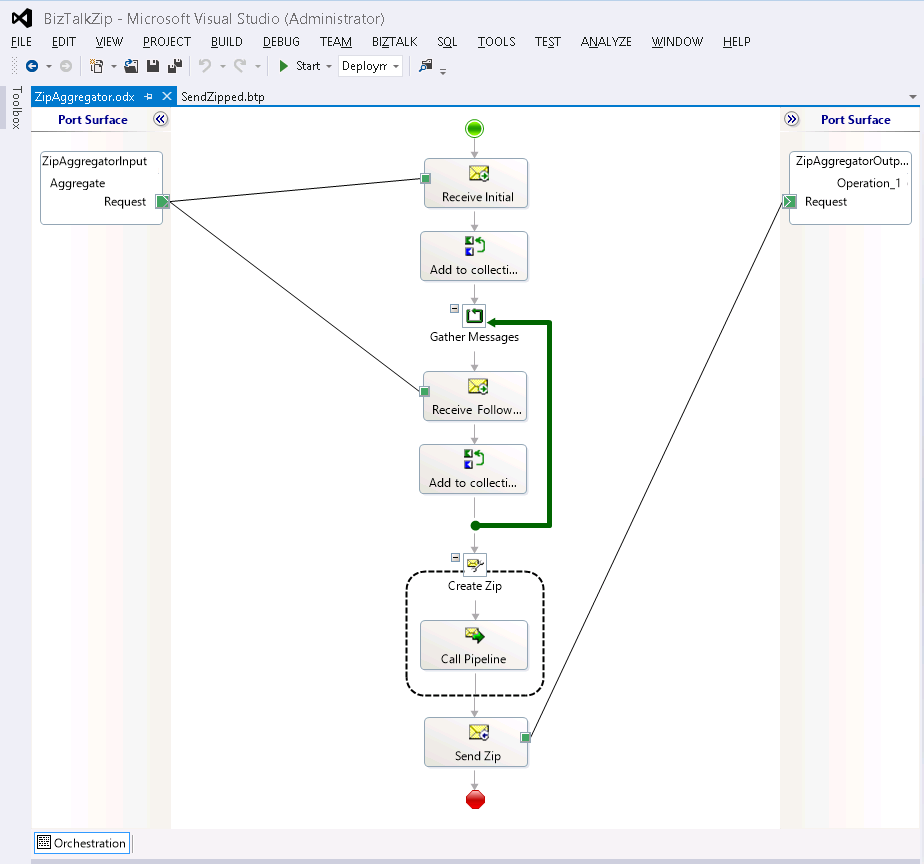
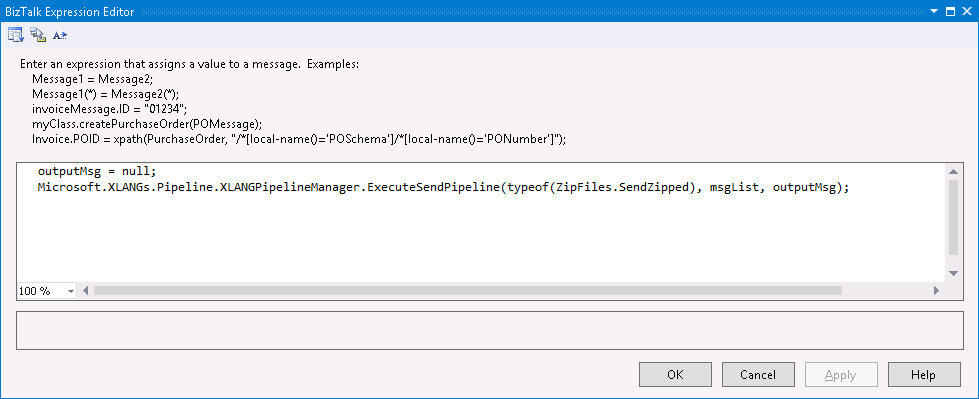
The project includes a pipeline configured with the Zip component and an orchestration that collects messages in a loop, stores them in a list, and invokes the pipeline from within an expression shape to create the archive.
Orchestration Design
Expression Shape
To use the sample project, compile and deploy the orchestration. Then create a file receive location and a file send port, and bind them to the orchestration. Both should use the default pass-through pipeline, since the orchestration invokes the send pipeline to generate the Zip archive.
In this example, the orchestration collects six messages and adds each to a single Zip file. After placing six files in the receive location directory, a single Zip archive containing all files will be created.
We appreciate your feedback. If you have any questions, comments, or suggestions about this article please contact our support team at support@nsoftware.com.